Same keys. Which rule?
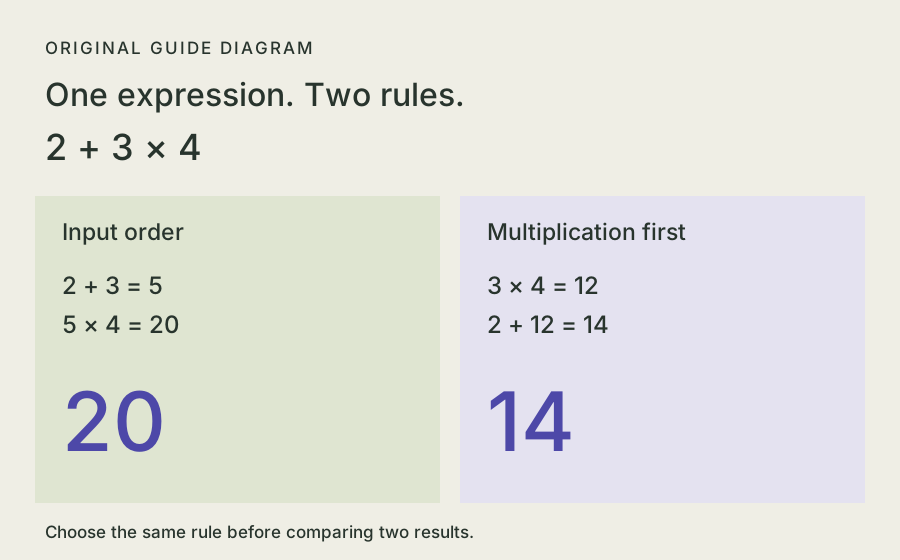
Calculate 2 + 3 × 4 in input order. Change the rule to multiplication first, then calculate again. Read the steps as well as the answer.
An original four-operation practice calculator. Try your own expression or use the samples.
Read what the comparison established
The Hardened Stack reports eight matching calculations in a Windows Calculator recreation. The build used Clean room and an existing Claude Code setup. At 2:00, both visible windows show 220; the report later identifies the automated checks as building and opening a window.
Use an explicit operation and expected result for each feature you need. The check-scope guide separates build, launch, behavior and visual checks.
Choose the same input and rule
| Try | Expected result | What it checks |
|---|---|---|
| 0.1 + 0.2 | 0.3 | Decimal arithmetic |
| 2 + 3 × 4 | Input order: 20. Multiplication first: 14. | The chosen rule |
| 1 ÷ 7 | ≈ 0.1428571428571429 | This exercise’s 16-place, half-up display rule |
| 123456789 × 987654321 | 121932631112635269 | Large-integer precision |
| 7 ÷ 0 → Clear → 7 + 2 | A division-by-zero message, then 9 | Error recovery and cleared state |
Reset between checks. When changing an input or rule, calculate again so the displayed answer belongs to the current expression.
Ask for behavior you can verify
Begin with four operations, an explicit rule and a small set of checks. Expand after those work.
- Choose the target behavior. State whether operations run in input order or use precedence.
- Supply exact checks. Keep the input, expected answer and display rule together.
- Check the delivered app. Follow its run instructions, try each case and keep one failed action for the next revision.
A small calculator practice brief
Build a small four-operation calculator with a visible expression and result.
Offer input-order and multiplication/division-first evaluation rules.
Use exact decimal or fraction arithmetic so 0.1 + 0.2 displays 0.3.
Show 2 + 3 × 4 as 20 in input order and 14 with precedence.
Show 123456789 × 987654321 exactly as 121932631112635269.
For repeating fractions, display at most 16 decimal places with half-up rounding.
Mark rounded results. Keep intermediate arithmetic exact.
Changing the expression or rule must clear the previous result.
Handle division by zero with a useful message.
Provide Clear, backspace, keyboard calculation and visible calculation steps.
Verify Clear after an error allows 7 + 2 to return 9.
Include run instructions and the actual checks performed.A focused revision when a decimal check fails
For input 0.1 + 0.2, the expected display is 0.3.
Correct the arithmetic and keep the large-integer check exact.
After the change, repeat the decimal, mixed-operation and Clear-after-error checks.
Report the actual outputs.
A Craft Anything build uses your configured coding agent. The calculator above and its examples work here without an account.
Continue from the result
- Find the generated code and run instructions.
- Turn one failed calculation into a specific revision.
- Explore the native utility’s byte-level checks.
Sources and exercise notes
Source case: The Hardened Stack’s November 5, 2026 video, a v0.3.0 Windows experiment. The exercises, diagram and briefs are original learning materials. Decimal and fraction targets were independently checked; long integers were compared with Python integers and Node BigInt. The two rule definitions follow the versioned Microsoft README linked above. See how these guides are prepared.