Count, replace and undo
Find cat and replace it with dog. Start with whole words and ignore case: the first, second and fifth lines should change.
Up to 4,000 characters. You can edit the sample here.
3 matches in the current text
Count the whole-word matches.
Original literal-text exercise. Word boundaries and case folding use ASCII letters, digits and _. Search characters are treated as text.
Check the function behind each menu
The Hardened Stack’s Notepad++ recreation is named TabPad. Both editors replace three occurrences in the demonstration. Other checks show empty plugin/tool menus and a code file without the reference editor’s syntax colors. Inspect each needed feature with its own input and expected behavior.
- 7:15 · start the actionOpen Replace and inspect its options
- 7:25 · inspect what changedRead the text, then open another menu
- 7:45 · check a different capabilityCompare the same code file
# Original practice sample
def double(value):
    return value * 2

print("craft", double(7))# Original practice sample
def double(value):
return value * 2
print("craft", double(7))Original guide example. Highlighting changes presentation; both views contain the same source text.
Change one matching option
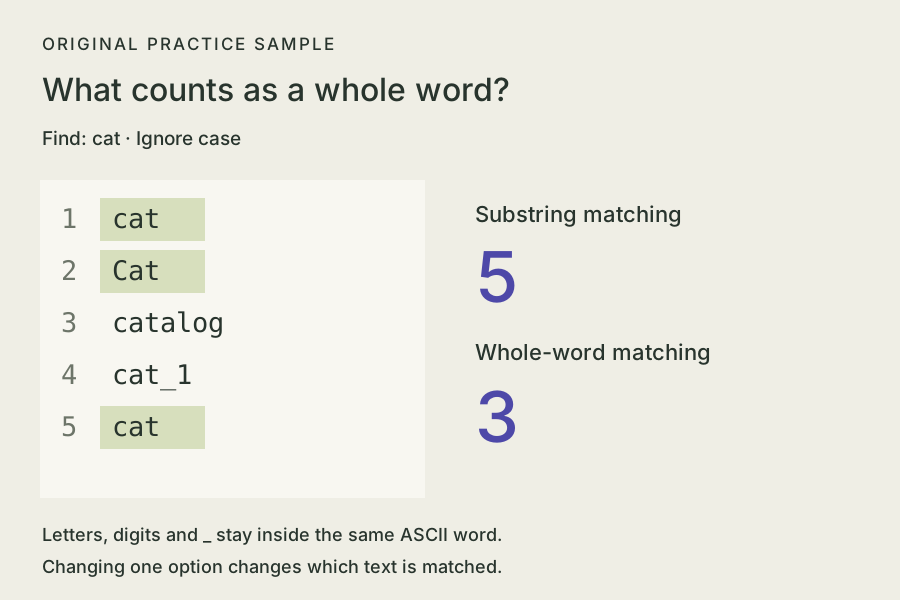
| Match whole words | Match case | Count for cat |
|---|---|---|
| Off | Off | 5 |
| Off | On | 4 |
| On | Off | 3 |
| On | On | 2 |
- Count before changing the text. With whole words on and Match case off, Count shows 3 and leaves the text unchanged.
- Replace once. Replace All changes lines 1, 2 and 5 to dog. Keep catalog and cat_1.
- Repeat the same action. It makes 0 replacements. The text stays as it is.
- Undo, then reset. Undo replacement restores the previous text. Reset lesson restores the original sample, search options and Find focus.
In Notepad++, choose Normal search, turn Wrap around on and In selection off for a whole-document check. Its official searching manual explains how those settings affect scope.
Give each required feature a check
| Feature | Action | Expected result |
|---|---|---|
| Replacement | Use the sample and whole-word options | 3 replacements; the two longer words remain |
| Undo | Undo the replacement | Restore the exact previous text |
| Save and reopen | Save under a new filename, close and reopen it | The saved text matches the edited document |
| Code colors | Paste the code example above and choose Python | Visible keyword/string/number styles; unchanged source text |
| A requested menu action | Open it and try its stated behavior | The action works, or its unavailable state is clear |
If a feature fails, record the smallest input and its expected/actual result in a problem note. A useful revision names one action, such as preserving text when Undo is used.
Start with a small text-editor brief
Give the builder a bounded task and keep the sample files with the project. Begin with text operations you can check.
An original editor practice request
Build a small plain-text editor with visible text and Find/Replace fields.
Support literal search, Match case and ASCII whole-word matching.
Use this five-line sample: cat, Cat, catalog, cat_1, cat (one entry per line).
Count must leave the text unchanged.
With whole words on and Match case off, replacing cat with dog changes 3 entries.
Keep catalog and cat_1 unchanged.
A second identical replacement must report 0 and preserve the text.
Provide Undo for the last replacement, preserving the prior text exactly.
Provide Reset and a UTF-8 text download with no added newline.
Changing search options must update the count before a replacement.
Keep text in the current page without automatic saving or submission.
Include run instructions and actual results for these checks.A focused revision when replacement changes too much
With whole-word matching on and case ignored, cat must match lines 1, 2 and 5.
Keep catalog and cat_1 unchanged.
Fix the matching boundary, then repeat Count, Replace All, a zero-match repeat and Undo.
Report the before/after text and replacement counts.
Craft Anything builds use your configured coding agent. The text exercise and downloads on this page work without an account.
Keep the files and the checks together
- Locate the generated source and run instructions.
- Keep a clear expected-versus-actual problem note.
- Choose another account-free practice route.
Sources and sample verification
Source case: The Hardened Stack’s November 5, 2026 video, using Craft Anything v0.3.0 and Notepad++ 8.9.8.1. The text/code samples, diagrams and practice brief are original. Python and JavaScript independently confirmed the fixed ASCII match counts. Notepad++’s versioned language documentation and file documentation support the external-app checks. See how the guides are prepared.